


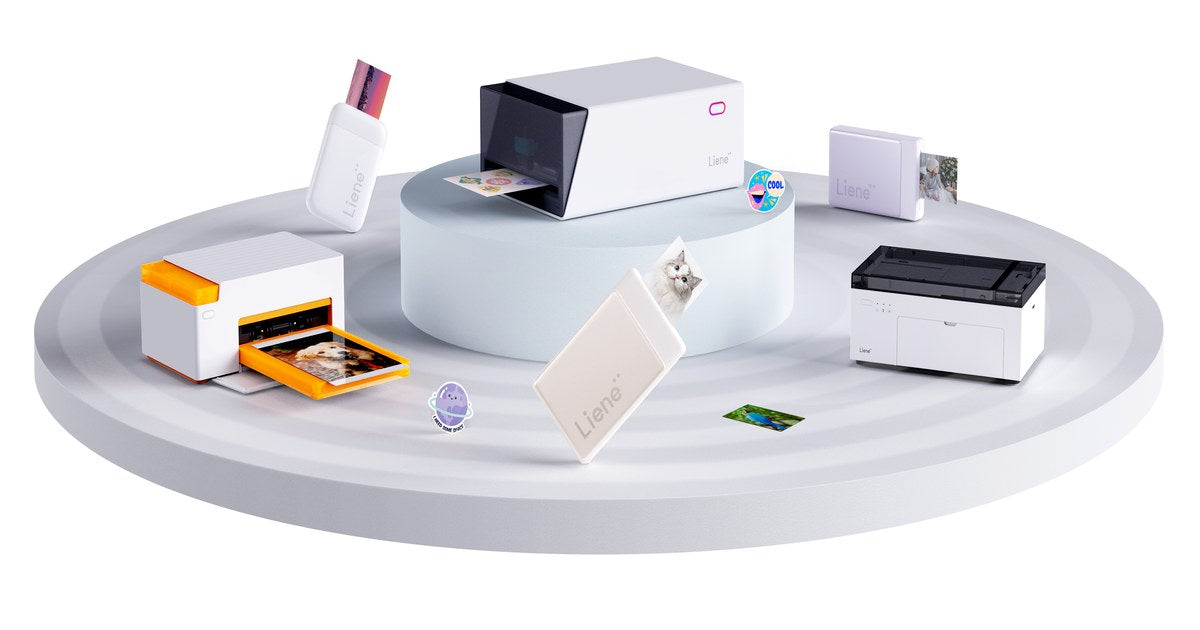
For proper 4x6 prints at home, the kind that end up in albums and frames, the machine to look at is a dye-sublimation printer, and ours is the Liene Amber. Small photos are a different shopping trip entirely: the Liene Pearl prints 2x3 photos that fit in a pocket and stick where you put them. And if you print twelve photos a year, honestly, a print service might still be your best friend, and we'll say so below. This guide sorts the 2026 field by what you plan to print, because that one question settles more than any spec sheet will.
Quick Picks
Best 4x6 photo printer for home:
the Liene Amber M100 $159.99 bundle includes 100 sheets and three cartridges. Refills work out to about $0.40 per 4×6 print.
Best mini and portable photo printer: the Liene Pearl K100, $99.99 with 50 sheets included, pocket-sized, printing on paper that needs no ink cartridges, with an adhesive back on every photo.
Best if you rarely print: no printer. Your phone plus a print service handles a dozen photos a year with no complaints, and a machine you only use twice ends up as a shelf ornament anyway.
The Three Routes, Side by Side
| 4x6 at home (dye-sub) | Pocket prints (Zink) | Print service | |
|---|---|---|---|
| Print size | 4x6", album and frame ready | 2x3", adhesive-backed | Any size |
| How it prints | Thermal dye-sublimation, laminated finish | Inkless Zink paper | Lab equipment |
| Lives | On a shelf or desk | In a bag or pocket | Somewhere else entirely |
| Waiting | Under a minute per print | Moments per print | A trip or a shipping window |
| Makes sense when | You print albums, frames, gifts | You journal, scrapbook, share on the spot | You print a handful a year |
What to Look For in a Photo Printer
Five things decide how the purchase goes, and they're worth a minute each before any brand names enter the picture.
- Print size. 4x6 is the album standard, the frame standard, and close to the aspect ratio your phone already shoots, so if the prints are destined for walls and books, that's your lane. 2x3 is a different kind of object, closer to a keepsake than a print, the sort of thing you hand to someone at a party or stick in a journal that afternoon.
- Printing technology. This decides how the photo holds up over the years. Dye-sublimation lays color down in continuous tone and seals the print under a laminate, which is why those prints shrug off water, fingerprints and fading. Zink skips ink altogether, forming the color inside the paper itself, and that trick is the whole reason a printer can fit in a pocket.
- Per-print cost. Deserves more attention than the price tag on the box, because paper is the cost you pay again every month you use the thing. Work out what one finished photo costs on each machine before comparing hardware.
- Connection style. Wi-Fi suits a family printer that several phones talk to; Bluetooth suits a printer that lives in one person's bag.
- The software. A good companion app handles the cropping, filters and layout for you, and some go further than you'd expect, printing ID and visa photos at home turns out to be the feature people mention most.
Route 1: 4x6 Prints at Home
The Liene Amber M100 is a shoebox-sized dye-sublimation printer that turns phone photos into finished 4x6 prints in under a minute each. Dye-sub is the same category of technology photo labs use: color goes on in continuous tone, then an automatic laminate seals the print against water, fingerprints and fading, and it comes out of the machine dry to the touch. No liquid ink anywhere in the process.
The practical details, quickly:
- Wi-Fi with up to five devices at once, so in a household, everyone's phone can print to the same machine without anyone setting anything up twice.
- The free Liene Photo App works on iOS, Android, Windows and macOS. It includes frames, filters and an ID Photo Mode for printing passport and visa photos at home.
- The bundle math is the reason we point at the 100-sheet kit: $159.99 with three cartridges included works out to around $0.40 a photo, roughly 60% less than a shop would charge for the same print.
Two siblings worth knowing about: the Amber M200 adds a built-in rechargeable battery good for about 40 prints per charge, for households where the printer travels to the party, and the newer Amber M110 trades Wi-Fi for Bluetooth with smarter app editing. Same paper, same finish, across the family.
One practical note before a big printing night: the paper cassette holds 20 sheets at a time, so a large batch means reloading every so often rather than walking away for an hour.

Route 2: The Pocket Route
The Liene Pearl K100 is the other philosophy entirely:
- $99.99 with 50 sheets in the box, and at 0.4 lb it rides in a pocket or purse.
- Zink printing, no cartridges. The color forms inside the paper itself, so there are no ribbons and nothing to run out of except the paper.
- Bluetooth to your phone, about 30 prints per USB-C charge, and you can print while it charges.
The detail that changes how people end up using it is the adhesive backing on every print. Photos go straight into journals, onto laptops, water bottles and gift tags, and somewhere along the way the Pearl turns into a scrapbooking tool that happens to be a printer. The paper comes in color and black-and-white, and the app handles borders, filters and enhancements before anything prints.

If the sticker side of that appeals more than the photo side, two of its relatives go further: the Pearl N200 Pro brings dye-sub quality to the same portable sticker format, and the PixCut S1 prints, laminates and cuts full 4x7" sticker sheets at home.
Route 3: No Printer at All
Some people should not buy a photo printer, and a buying guide that never says so is an ad. If your printing amounts to a dozen photos a year, a print service or the drugstore photo counter costs less than any machine, and the only price is the wait or the trip. The math starts leaning the other way once printing becomes a habit rather than an errand, when there are albums in progress, a journal going, gifts, a wall that keeps growing. Somewhere around there, owning the machine begins paying for itself, partly in money and partly in photos that would otherwise still be sitting on your phone.

What a Photo Costs
- Amber: about $0.40 per 4x6 print using Liene cartridge-and-paper packs, and by Liene's own comparison that runs roughly 60% below typical shop pricing.
- Pearl: the cost is simply the Zink paper, since there is no ink to buy, ever.
- Print services: too varied to quote honestly, but the pattern tends to repeat: cheap per print in big batches, noticeably less cheap for small ones once shipping or the trip gets counted, and the photos show up on their schedule rather than yours.
FAQ
Should I get a 4x6 photo printer or a mini one? Decide where the photos are going. Albums, frames and gifts point at 4x6 and the Amber. Journals, laptops and handing prints to friends at the moment point at 2x3 and the Pearl. Plenty of households eventually end up with one of each, since they don't overlap much.
What's the difference between dye-sublimation and Zink? Dye-sub transfers color from a cartridge in continuous tone and seals it under a laminate, which is what gives Amber prints their lab-style finish. Zink forms the color inside the paper itself with heat, no cartridge at all, which is what lets the Pearl fit in a pocket. Both come out dry to the touch and resist water and smudging.
Can I print photos straight from my iPhone? Yes, with either printer. The free Liene Photo app does it from an iPhone, and there is an Android version as well. Amber connects over Wi-Fi and holds up to five devices at once. Pearl pairs over Bluetooth and is small enough to live in your bag.
Will the prints fade or smear? Amber prints leave the machine already laminated, which is what lets them stand up to water, fingerprints and years on a wall. The Pearl's Zink prints get their durability from the paper itself, water resistant, tear resistant and smudge proof without any coating step. Neither needs drying time.
Can I print passport photos at home? You can, and it might be the most quietly useful feature in this whole guide. The Liene Photo App has an ID Photo Mode that formats passport and visa photos to spec, printed on the Amber for a fraction of the photo-counter price.
How much does each photo cost to print? Around $0.40 per 4x6 on the Amber with Liene paper-and-cartridge packs. On the Pearl, the per-photo cost is just the Zink paper, since there are no cartridges to replace.
Match the Printer to the Photos
Buy for the photos you'll print this season rather than the ones you might get to someday. If the plan involves a wall of frames or a family album, that's the Amber. A journaling habit or a life spent mostly out of the house leans Pearl, and a dozen prints a year is a perfectly good reason to keep your money. However you land, the point of any of this is getting photos off your phone and into the room where people can see them.



Leave a comment
This site is protected by hCaptcha and the hCaptcha Privacy Policy and Terms of Service apply.